# Creating Shot Library

## Notion Database Profile
1. [Create Your Notion Database Profile](/user-guide/databases/#creating-notion-database-profile).
2. Duplicate Notion's [Shot Library Template](/user-guide/databases/#notion-template) in to your Notion account.
!!!info Info
Given the structural design of Airtable, implementing and utilising a Shot Library is impractical. Airtable treats each entry as a record, whereas Notion treats each entry as a page. Consequently, Notion is the preferred platform for a Shot Library. Notion allows users to add text, embed images, and include links within each page entry, providing greater flexibility and functionality that is not possible in Airtable. Therefore, this Shot Library Template is exclusively designed for use with Notion.
!!!
!!!info Info
You possess the liberty to tailor the [Shot Library Template](/user-guide/databases/#notion-template) to suit your preferences, affording you the opportunity to incorporate additional [Notion Database properties](https://www.notion.so/help/database-properties) as per your discretion.
!!!
3. [Obtain your Database URL](/databases/notion-prerequisite/#obtain-your-database-url) by going to your Notion Database, and right-click on the view and click **Copy link to view**.
4. Paste the URL into `Notion Database URL` field.
!!!info Info
It is presumed that you have acquired and inputted your [Notion Integration Token](/databases/notion-prerequisite#obtain-your-integration-token).
!!!
5. Type `Shot ID` into `Rename Key Column` field.
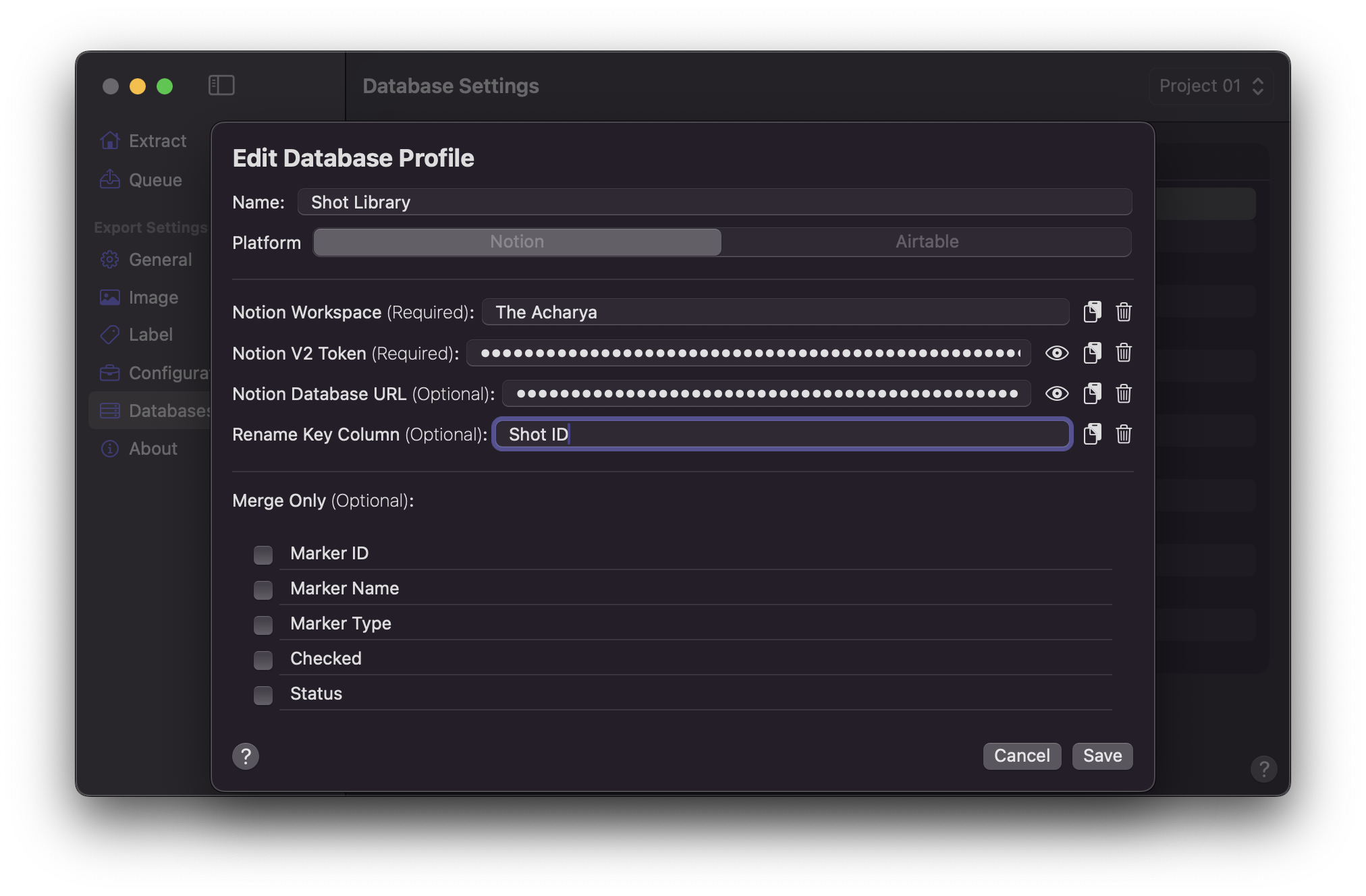
5. Click `Save` once values are entered.
## Configuration Setup
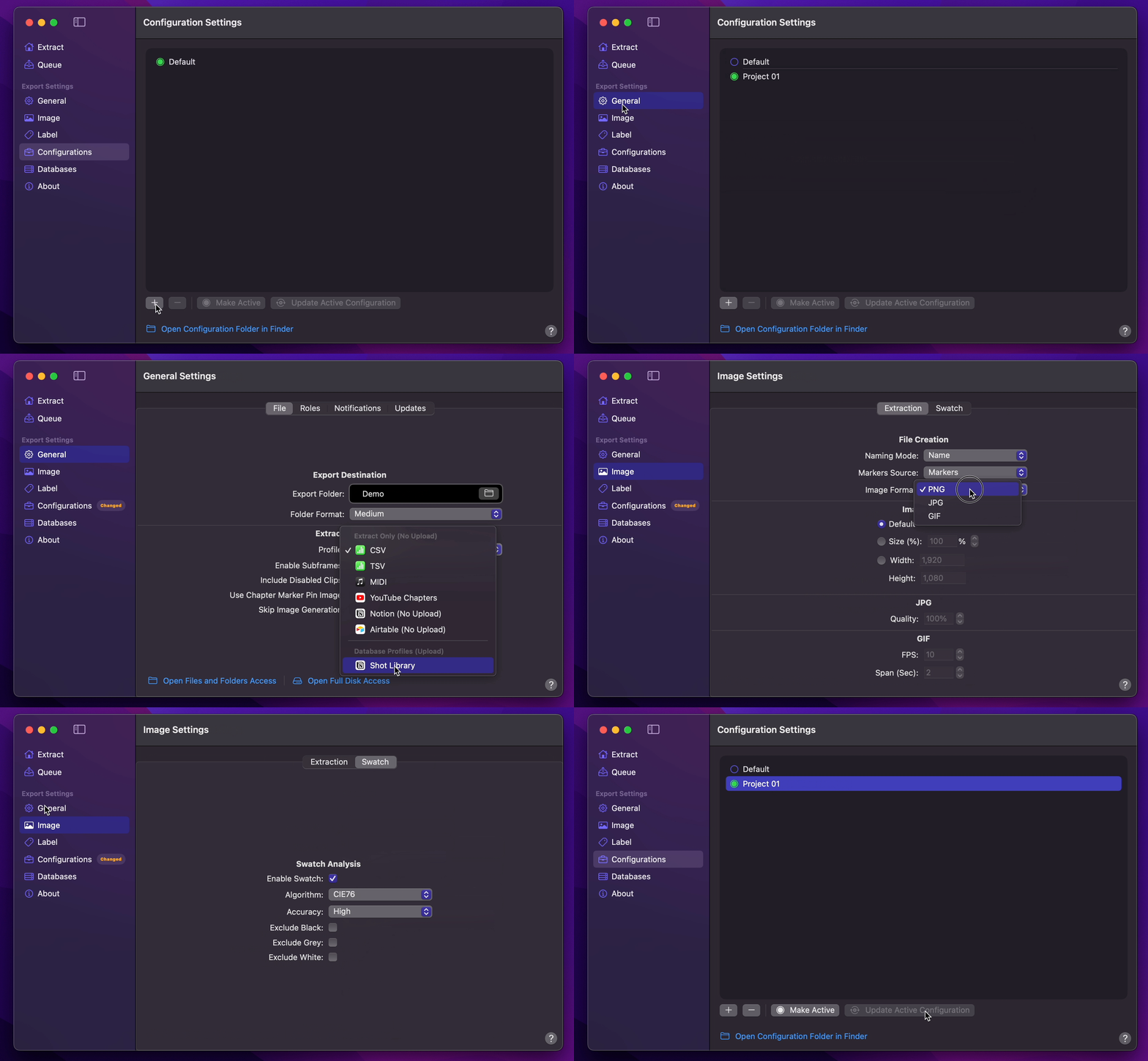
1. [Create Your Configuration](/user-guide/configurations/#add-configuration).
2. You can select your desired Export Destination by clicking on the [Folder Icon](/user-guide/general/#export-destination).
3. You can select your Notion Database Profile as your [Extraction Profile](/user-guide/general/#extraction-profile).
4. Set [Naming Mode](/user-guide/image/#naming-mode) to `Name`.
5. You can set [Image Format](/user-guide/image/#image-format) to `GIF`.
6. Enable [Swatch](/user-guide/image/#swatch).
7. Select your desired [Overlays](/user-guide/label/#overlays) (Optional).
8. Return back to Configurations to [Update Active Configuration](/user-guide/configurations/#update-active-configuration)
## Final Cut Pro to Notion (Shot Library Template)
1. Add markers to your desired shots.
2. Ensure each marker has an identifiable unique name.
3. Select `Marker Data Source` or `Marker Data H.264` from [Final Cut Pro's Share menu](user-guide/share-destination/).
4. **Marker Data** will start to perform its task.
## Afterthoughts
This bespoke creation of the Shot Library Database is distinctively tailored to each user, with no additional subscription required beyond that of Notion itself. However, it does necessitate manual input and extensive data collection for each frame.
Commercial solutions generally alleviate the burden of organisation, tagging, cataloging, and curation, yet this convenience is reflected in the cost passed onto the user. These platforms allow users to dedicate their time primarily to searching and selecting the precise shots needed for their projects.
Moreover, many of these platforms bind users within their ecosystem, lacking any functionality for data exportation. They do not provide APIs that would permit the integration of image sets into a user’s own database, thus limiting flexibility and control over personal data.
Through the meticulous process of manual tagging, organisation, and in-depth research associated with each cinematic frame, individuals inevitably acquire a profound understanding of the intricate elements comprising frame composition, lighting dynamics, and the art of shot design. This journey of exploration not only enhances one's technical proficiency but also cultivates a nuanced appreciation for the visual storytelling nuances inherent to the craft. Such immersive engagement serves as an indispensable asset for directors and cinematographers alike, elevating their ability to conceive, articulate, and execute cinematic visions with precision and artistic finesse.